Nikon SB-5000 Uživatelský manuál Strana 23
- Strana / 128
- Tabulka s obsahem
- KNIHY

- Speedlight 1
- About the SB-5000 3
- About this user’s manual 3
- Icons used in this manual 4
- Table of Contents 5
- Information 7
- For Your Safety 8
- Preparation 10
- Wireless Regulation Data 12
- Check before Use 14
- Life-long learning 15
- Operation 16
- Settings and the LCD 20
- Rotary multi selector 21
- ■ Selecting items 23
- ■ Changing settings 23
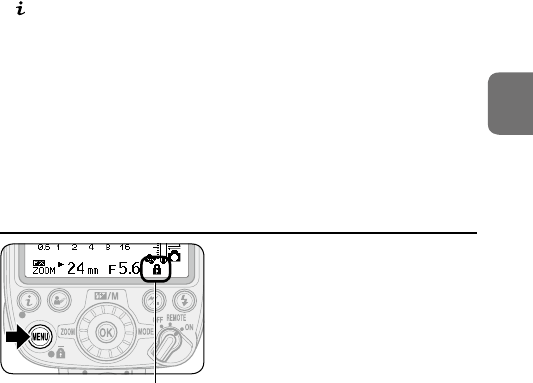
- Activating key lock 23
- Using menu 24
- Two-button reset 26
- Unified Flash Control 27
- Basic Operations 29
- Battery type 30
- Low battery power indicator 31
- Adjusting the flash head 33
- LCD example 34
- Selecting the flash mode 35
- Menu Items and Settings 37
- Custom menu 39
- Wireless item menu 41
- Setup menu 42
- Flash Modes 46
- Standard i-TTL 47
- Manual Flash Mode 49
- Auto Aperture Flash Mode 51
- Non-TTL Auto Flash Mode 51
- Repeating Flash Mode 52
- Wireless Multiple Flash-unit 53
- Photography 53
- Control 56
- ■ Advanced Wireless Lighting 57
- Setting the Master Flash Unit 61
- : Appears when ready to fire 62
- Setting a Remote Flash Unit 63
- Preparation for Photography 64
- Setting the link mode 65
- Pairing 66
- PIN code 66
- Setting the link 67
- Pairing succeeded 68
- Pairing failed 68
- Advanced Wireless Lighting 69
- Lighting 70
- Remote flash unit setting 72
- Quick wireless control 74
- Setting up Remote Flash Units 75
- Master flash unit 77
- Remote flash units 77
- Control Concurrently 79
- Flash-unit Photography 81
- Master flash unit 82
- indicator 84
- Bounce Flash Operation 87
- Taking Close-up Photographs 89
- (included) 92
- Flash exposure compensation 96
- Power zoom function 96
- AF-assist illumination 97
- Test firing 97
- Modeling illumination 98
- Standby function 99
- Thermal cut-out 100
- Functions 101
- ■ Cooling system 101
- Tips on Speedlight Care and 102
- Reference Information 102
- Warning indicators 104
- Tips on Speedlight Care 107
- Storage 108
- Notes on Batteries 109
- About the LCD Panel 110
- Optional Accessories 111
- ■ Color Filter Holder SZ-4 112
- ■ Water Guard WG-AS4 112
- External power source 116
- Specifications 118
- TTL auto flash mode) 122
- Service Warranty 126
- Nikon User Support 127
Související produkty a manuály pro Blesky k fotoaparátu Nikon SB-5000
 (136 stránky)


 (220 stránky)
(200 stránky)
(132 stránky)
(164 stránky)
(220 stránky)
(200 stránky)
(132 stránky)
(164 stránky)

 (220 stránky)
 (523 stránky)
(132 stránky)
(136 stránky)
(100 stránky)
(144 stránky)
(100 stránky)
(100 stránky)
(96 stránky)
(96 stránky)
(100 stránky)
(136 stránky)
(132 stránky)
(523 stránky)
(132 stránky)
(136 stránky)
(100 stránky)
(144 stránky)
(100 stránky)
(100 stránky)
(96 stránky)
(96 stránky)
(100 stránky)
(136 stránky)
(132 stránky)
© 2020, manymanuals.cz. Všechna práva vyhrazena. | 0.053 s |
 Manymanuals.com
 Manymanuals.de
 Manymanuals.fr
 Manymanuals.it
 Manymanuals.pl
 Manymanuals.cz
 Manymanuals.es
 Manymanuals-pt.com
Komentáře k této Příručce